SYS · VoiceOnline
Intercom and DMR
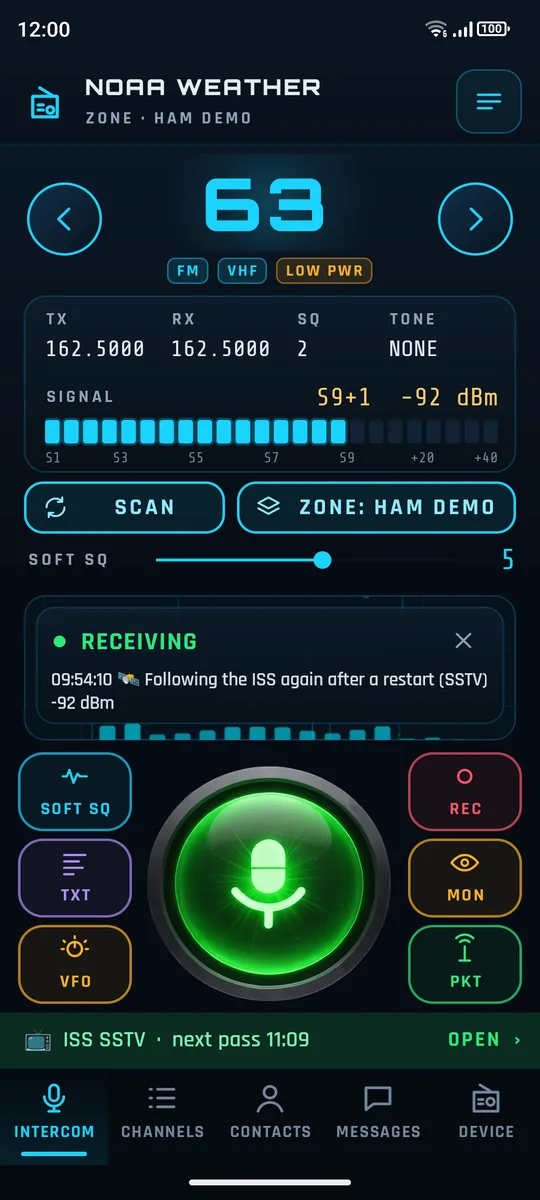
A big neon channel display and push-to-talk, talkgroups and DMR texts, zones and scanning, Soft SQ for weak signals, and live captions of what you hear, made on the phone and working offline.
Free, open-source ham radio for Android
SignalDeck turns a rugged Android phone with a built-in two-way radio into a complete amateur station: DMR and FM voice, APRS, SSTV pictures, pager messages, M17 digital voice, FT8, Winlink e-mail, weather alerts and satellite passes, all on the radio already inside the phone.
Public beta · Android 10+ · needs root (Magisk) · free, GPL v3
Subsystems
A big neon channel display and push-to-talk, talkgroups and DMR texts, zones and scanning, Soft SQ for weak signals, and live captions of what you hear, made on the phone and working offline.
APRS with a station map and an internet gateway, SSTV send and receive, FT8, M17 digital voice on supported phones, pager messages, Winlink e-mail by radio, Morse and RTTY decoding, and NOAA weather alerts.
A built-in, PIN-protected web page on your own network runs the radio from a laptop or tablet, with audio, the APRS map, pager and messages.
Station roster
| Phone | Status | What works |
|---|---|---|
| Ulefone Armor 26 Ultra | Fully supported | The reference phone. DMR and FM, VHF and UHF. |
| ANYSECU W6+ | Supported, beta | FM, UHF only. No S-meter, band scope or fox hunt. |
| Ulefone Armor 20WT | Expected to work | Same radio family as the Armor 26. Confirmation wanted. |
| Blackview Xplore 1 | In progress | Same protocol, audio on a second port. Unverified. |
| Unihertz Atom XL | In progress | Bring-up running. |
| Ulefone Armor 3WT | Investigated | Older command set. Not supported yet. |
Features vary by phone, depending on its radio module. Another phone? Run the Device report in the app and send it. That is how new phones get added.
Uplink
Later builds arrive in the app: Device → Updates, with Release and Beta paths. Release notes
Root the phone with Magisk and install the APK.
Open SignalDeck and grant root. It imports your stock app's channels on first start.
Device → Keep access after reboot makes radio access permanent.
Crew
Test for bugs, suggest features and talk with other SignalDeck users.
Fork the project and add your phone. When it works, send it back for review and it is merged in for everyone.